Audiomack: Music Downloader
Audiomack Music AppsMusic & Audio
4.8198.22K Reviews
- Version
- Varies With Device
- Installs
- 100.00M
- Age Rating
- Teen
Screenshots
Our Review of Audiomack: Music Downloader
 Analysis by Appyee
When I use a music app in a busy day, I want it to make the next step obvious: find a track, save it for later, and get back to what I was doing. Audiomack: Music Downloader is built around that kind of listening, with downloads and playlists at its center. I find it most appealing when I want to explore music beyond familiar chart staples, then keep a selection close for a commute or a patchy connection.
Readability and finding your way around
Audiomack is a free music and audio app from Audiomack Music Apps. Its average rating is 4.8 from around 7.8 million ratings, and it has been installed over 100 million times. Those figures suggest broad use, but what matters in practice is whether the app makes browsing feel manageable. I find the main appeal is that it gives discovery, playlists, and listening a fairly direct path rather than asking me to configure a complicated library first.
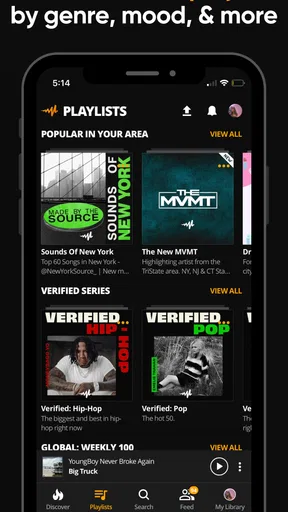
Its music catalog spans familiar genres as well as less mainstream sounds, and curated selections can help when I do not have a particular artist in mind. For a new listener, I would start with a genre or mood playlist, then follow interesting tracks outward rather than relying only on the most prominent trending picks. That approach makes browsing feel more personal and can surface artists who are not already on my regular rotation.
The trade-off is that a large catalog can still feel like a lot to sift through. A trending list is useful for a quick snapshot, but it naturally favors what is already attracting attention. If I want something very specific, searching by artist or track is a better starting point; if I want to be surprised, curated playlists are more inviting. I treat those as two different ways into the app rather than expecting one feed to do both jobs equally well.
Discovering the Audiomack Experience
When I first stumbled upon Audiomack, I was instantly drawn in by its sleek and user-friendly interface. It's got this vibe that makes you feel like you're stepping into a cool, underground music club. The app is super intuitive, and you don't need a Ph.D. in tech to get around, which is a huge plus in my book.
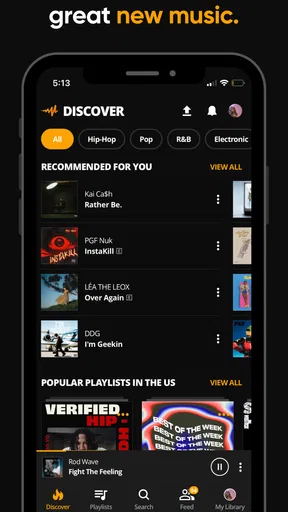
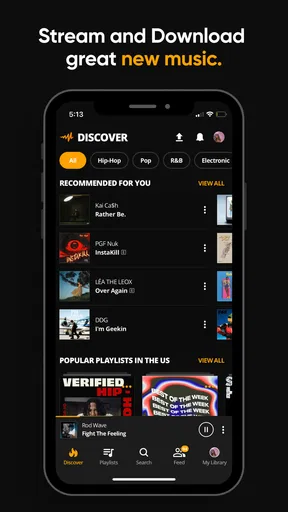
One of the first things that caught my attention was the vast library of music. Audiomack offers an extensive collection of songs, albums, and playlists across various genres. Whether you're into hip-hop, reggae, pop, or something more niche, there's something here for everyone. It's like having a personal DJ who knows your taste and keeps surprising you with new jams.
Offline Listening? Yes, Please!
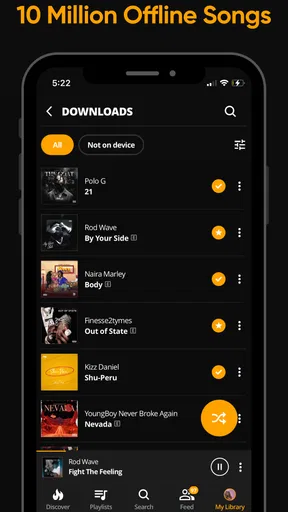
Now, let's talk about one of my favorite features: offline listening. You can download your favorite tracks and listen to them without an internet connection. This is an absolute lifesaver for those long commutes or when you're stuck in a place with dodgy Wi-Fi. Just download, plug in your headphones, and let the music transport you.
The download process is as smooth as butter. You simply tap, and voilà, the song is ready to go. It’s a feature that makes Audiomack stand out, especially for those of us who love to take our music on the go without worrying about data usage.
Curated Playlists and Trending Hits
Audiomack doesn’t just leave you to your own devices when it comes to discovering new music. The app is loaded with curated playlists that cater to every mood and occasion. Whether you're in the mood for some workout anthems, chill vibes, or the latest chart-toppers, Audiomack has got you covered.
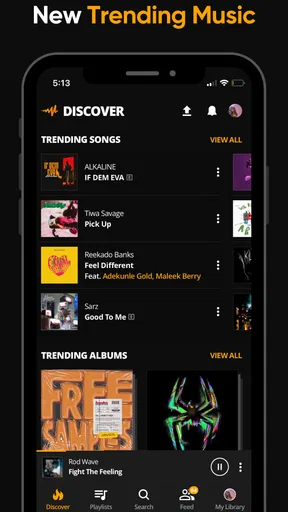
Plus, the "Trending" section is a great way to keep your finger on the pulse of what's hot in the music world. It's like having a friend who's always in the loop about the latest hits and is eager to share them with you.
Supporting Independent Artists
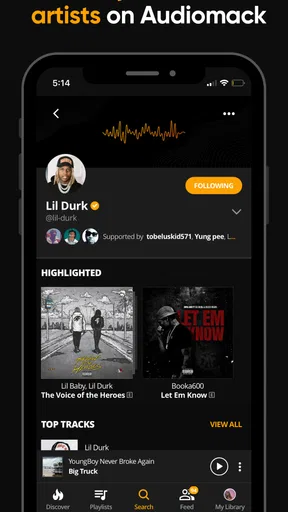
One thing I genuinely appreciate about Audiomack is its support for independent artists. The platform provides a space for upcoming artists to showcase their talents and reach a broader audience. It's a win-win; listeners get access to fresh, new sounds, and artists get the exposure they deserve.
If you're someone who loves to discover artists before they hit the mainstream, Audiomack is the place to be. You might just find the next big thing before everyone else does!
User Experience and Interface
Navigating through Audiomack is a breeze. The app's design is visually appealing, and everything is neatly organized. Whether you're searching for a specific track or just browsing, it's an effortless experience. The app's performance is smooth, with minimal buffering, ensuring you can enjoy your music without interruptions.
Making downloads work for real routines
I would not wait until I am already underground on a train or standing somewhere with no signal to decide what to save. I would use a connected moment to choose a small set of tracks for the next part of the day, then check that the downloads are ready before leaving. That simple habit turns offline listening into a dependable routine instead of a last-minute gamble.
Downloads are especially useful when mobile data is limited or unreliable, but they also change how I browse. I can explore a playlist while connected, pick out songs worth keeping, and then switch to saved listening when I travel. The practical trade-off is that a download is a deliberate choice: I need to think ahead about what I actually want to hear rather than assume every discovery will be available offline automatically.
Unlimited playlists are handy for separating listening contexts without constantly rebuilding one queue. I might keep one playlist for focused work, another for a walk, and a third for new finds I want to revisit. The useful trick is to treat a playlist as a temporary listening plan, not just a permanent favorites bin. That makes it easier to return to a promising track without losing it among songs I already know well.
Listening when attention, movement, or surroundings vary
Music is often something I use while doing another task, so a clear route from browsing to playback matters. If I am cooking, packing, or getting ready to leave, I prefer choosing a playlist before my hands are busy. Audiomack’s discovery-led setup can suit that pattern: browse when I have time, then rely on a prepared selection instead of repeatedly searching mid-task.
For people who find dense screens tiring, the best approach is to keep each listening session simple. Start with one artist, playlist, or mood and avoid bouncing between sections just to find the perfect next track. I would also prepare downloads while seated and unhurried, particularly if small touch targets or quick gestures are difficult. Those are practical habits rather than special accessibility settings, but they can make using a music app less demanding.
Sound itself can be part of the access question. A playlist that works for a workout may be too intense in a shared room, while a quieter selection may suit reading or a low-stimulation break better. I would choose the music before entering a setting where changing it is inconvenient, and use headphones only when they are safe and appropriate. The app can provide the listening material, but the listener still has to match it to the environment.
Where the experience has limits
Audiomack is not the best fit for every music habit. If my priority is a familiar mainstream catalog, a highly personalized recommendation system, or a tightly managed collection of albums I already own, I may prefer a service designed around those needs. Audiomack’s strength is discovery and keeping selected tracks available offline; that does not automatically make it the ideal one-stop library for every listener.
There can also be a difference between finding a track in a catalog and finding the exact version I have in mind. When a song has multiple uploads, edits, or releases, I would check the artist and track details before saving it. This small verification step matters if I am building a playlist for a specific event or want to avoid discovering on the bus that I downloaded a version different from the one I expected.
The app is rated Teen, which is worth keeping in mind for families deciding whether it suits a younger listener. I would make that decision based on the individual, the music they seek, and the level of supervision a household expects, rather than assuming a music app is automatically appropriate for every age. The rating is a useful signal, not a replacement for a parent’s own judgement.
Audiomack is free to install, with in-app purchases ranging from about sixty cents to around twenty-five dollars per item. I would begin with the free experience and only consider a purchase if I clearly understand what it adds to my own routine. That keeps the decision grounded in actual use instead of paying because an option appears while I am browsing.
Who I would recommend it to
I would recommend Audiomack to listeners who enjoy looking beyond their usual rotation, especially people who want playlists, emerging artists, and offline access in one place. It also makes sense for someone who has a predictable commute or regularly visits places with weak connectivity: prepare a few selections beforehand and the app can become a useful part of that routine.
I would be more cautious about recommending it to someone who wants every listening decision made for them, or who expects a single service to match a very particular collection and discovery style. It is also less convenient for a person who rarely has time to browse and does not want to prepare music in advance. In that case, a service whose existing library and recommendation habits already fit them may feel easier day to day.
Compared with the usual subscription-focused streaming apps, Audiomack’s practical distinction is the emphasis on downloads and exploration rather than simply mirroring a personal collection. That makes it a useful companion even for someone who already uses another service: I can open it when I want fresh finds or a prepared offline selection, while keeping my familiar app for other listening habits. I see it as a strong alternative, not necessarily a reason everyone should replace what they already use.
Final Thoughts
In a world saturated with music apps, Audiomack: Music Downloader offers a refreshing change. It's more than just a music streaming app; it's a community for music lovers and creators alike. With its vast library, offline listening capabilities, and support for independent artists, Audiomack has carved out a special place in my heart.
So, if you're on the hunt for a music app that delivers both quality and quantity, give Audiomack a try. Who knows, you might just fall in love with its rhythm the way I did. Happy listening!
My inclusive verdict
For me, an inclusive music experience is not only about how much music is available; it is also about whether I can make the app fit different energy levels, surroundings, and routines. Audiomack gives me useful choices through discovery, playlists, and offline listening, while the most comfortable way to use it still depends on how I browse and prepare. I would keep sessions focused, save music before travel, and choose a playlist that suits the moment rather than trying to manage everything at once.
Its broad appeal does not erase the limits of a screen-based music app: browsing takes attention, touch interaction may not suit everyone equally, and the right track or version can take a little checking. Even so, I think it is a worthwhile option for curious listeners who value independent music and want more control over when they listen. If those priorities match yours, I would give it a try; if effortless, highly tailored discovery is your main need, another music service may be a better daily fit.
Privacy and Permissions
See what permissions an app requests and how it handles your data.
- Photos/Media/Files
- read the contents of your USB storage, modify or delete the contents of your USB storage
- Storage
- read the contents of your USB storage, modify or delete the contents of your USB storage
- Wi-Fi connection information
- view Wi-Fi connections
- Other
- view network connections, pair with Bluetooth devices, full network access, run at startup, control vibration, prevent device from sleeping, Google Play license check
Verdict
Strengths of Audiomack: Music Downloader
- Offline listening feature available
- Diverse music library options
- User-friendly interface
- Frequent updates with new tracks
- Free version has many features
Limitations of Audiomack: Music Downloader
- Ads can be intrusive
- Limited skips on free version
- Some tracks unavailable offline
- Quality varies across tracks
- Occasional app crashes reported
Similar Picks in This Category
View All
YouTube Music
Google LLC4.4

Samsung Music
Samsung Electronics Co., Ltd.3.8

Spotify: Music and Podcasts
Spotify AB4.3

JioSaavn - Music & Podcasts
Saavn Media Limited4.3

Lark Player:Music Player & MP3
Lark Player Studio - Music, MP3 & Video Player4.6

StarMaker: Sing Karaoke Songs
SKYWORK AI PTE. LTD.4.3
You May Also Like
View All


Frequently Asked Questions
What is Audiomack and how does it work?
Audiomack is a music streaming and downloading app that allows users to access a wide variety of songs, mixtapes, and albums. It offers both online streaming and offline listening by downloading tracks. The app is user-friendly, with features like curated playlists and trending charts to help discover new music.
Is Audiomack free to use?
Yes, Audiomack is free to download and use. It offers a free tier with ads, allowing users to stream and download music at no cost. For an ad-free experience and additional features, users can opt for Audiomack Premium, which requires a subscription.
Can I download music for offline listening on Audiomack?
Absolutely. One of Audiomack’s main features is the ability to download music for offline listening. This is particularly useful for users who want to enjoy their favorite tracks without an internet connection, making it convenient for travel or areas with poor connectivity.
Is Audiomack legal and safe to use?
Yes, Audiomack is a legal and safe platform. It partners with artists and labels to provide authorized music downloads and streams. The app ensures that all music available is legally uploaded by rights holders, guaranteeing a secure experience for users.
Does Audiomack support all music genres?
Audiomack offers a diverse range of music genres. While it’s particularly known for hip-hop, rap, and R&B, it also features other genres like pop, electronic, reggae, and more. This diversity makes it a versatile platform for music lovers with varied tastes.
